Generative Fill Without Photoshop — Paint Over It, Describe the Fix
Paint a mask over one region and regenerate only that area from a prompt.
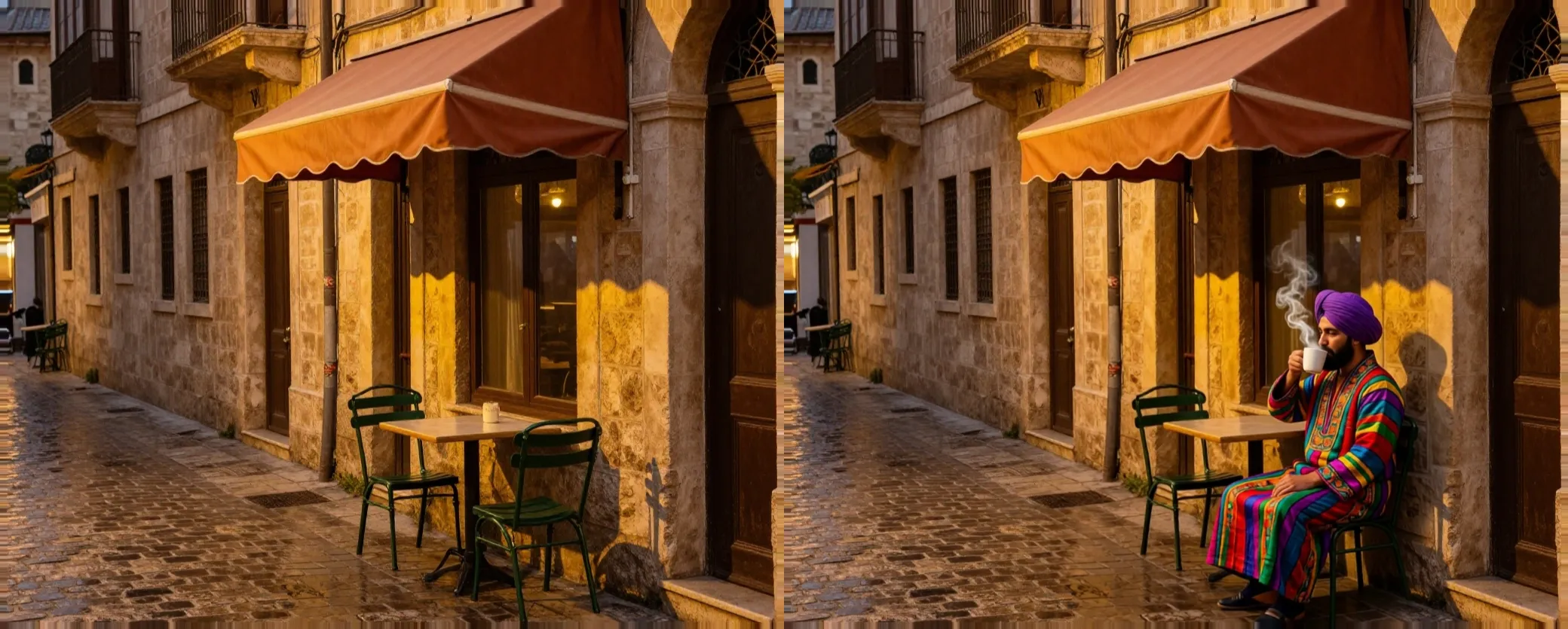
Inpaint lets you paint a mask over any part of an image and describe, in a prompt, what should appear there instead. Only the masked region is regenerated; the rest of the image is kept as it was.
Reach for it to swap out one object for another, fix a blemish or artifact, remove something small without a full re-generation, or add a detail that was never in the original shot — while the rest of the composition is kept as it was.
Inpaint bills a flat price per call on most models, with an extra component tied to output size on some — the editor shows the exact figure for your image and model before you commit.
Models
- Flux Klein 9B
- Qwen Image Edit
- Reimagine
How it's billed
Flat per call, may include a per-output-megapixel component depending on the model.
Frequently asked questions
Paint a mask directly over the region with the brush, then describe what should appear there in the prompt.
On the model that supports it, Denoise controls how much of the original masked pixels are preserved versus fully regenerated — low values keep more of the original, high values regenerate more freely. The other models ignore it.
Magic Eraser removes an unwanted object and fills the gap automatically. Inpaint lets you describe what should replace the masked area, so you can add or change something specific rather than just remove it.
No. Only the masked region is regenerated; the rest of the image is kept as it was.
Explore the other tools
Every tool lives in the same canvas — stack them on one image without leaving the page.

Ready to try Inpaint?
Free to start. Plans from $10/mo.